Introducción

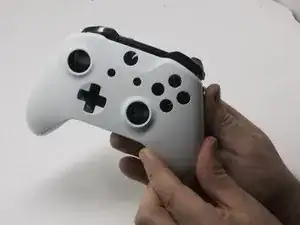
Las tapas del Joystick en tu controlador Xbox podrían dejar de responder o volverse pegajosas. Si esto sucede, podría ser necesario quitar las tapas de la palanca de mando para reemplazarlas o limpiarlas. Esta guía te enseñará cómo acceder y reemplazar los joysticks en tu controlador inalámbrico Xbox One modelo 1708.

  1. CZmZL2YuctGTuPJd
    CZmZL2YuctGTuPJd
    KHyRlDiLSFSdhQPm
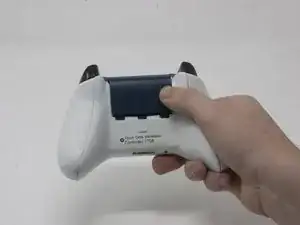
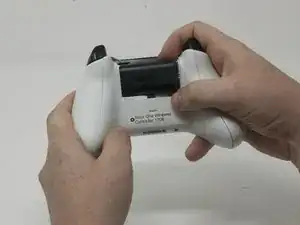
    • Desliza la tapa de la batería hacia la parte superior del control para retirarla.

    • Levanta las pilas o el paquete de pilas del compartimento de las pilas.

  2. 1RnNtaoQqQZkbY2E
    1RnNtaoQqQZkbY2E
    wVNiZ3TUwVBoC2FL
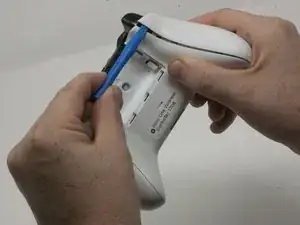
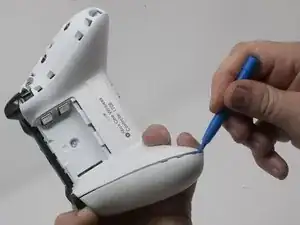
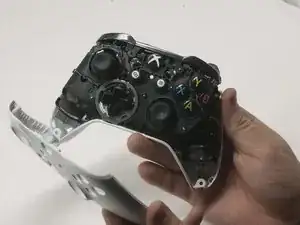
    • Inserta una herramienta de apertura de plástico en la costura superior y mueve suavemente la herramienta de apertura hasta la parte inferior del controlador.

    • Continúa usando la herramienta de apertura para sacar suavemente la placa lateral del controlador.

    • Repite este proceso para la segunda placa lateral.

    Only use a pry tool! The vibration motor wires are exposed and directly accessible from the side when opening. I attempted to open it with a small knife, expecting to be able to gently pry the clips open, accidentally sliced through my right motor’s wires.

    Sawyer Coe -

    Not a sharp of course.

    Kajus Slekys -

    If you have some Guitar picks laying around they work GREAT!

    Mike Beane -

  3. S6rlXDDRcqlumZ32
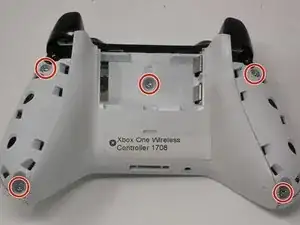
    • Despega suavemente la etiqueta de la batería o haz un agujero en el centro de la etiqueta en el compartimiento de la batería para revelar el tornillo oculto.

    • Retira los cinco tornillos de seguridad torx-9 de 9 mm de la parte posterior del controlador.

    Torx-8 security bits work as well.

    jahiamir -

    Torx 8 or 9 wasn’t working. I used 2.0 minus screwdriver

    richjlee -

    The 2.0 minus worked for me as well.

    metric -

    When sliding in the plastic cover during reassembly be sure it lines up with the battery compartment contacts. It can be really easy to not see it and bend the contacts. If you still encounter force during this step, depressing the triggers out of the way worked for me.

    Drew -

    Since mine is out of warranty I just broke out the security nib with a 2.0 standard bit. Then used a T8 torx.

    Tim LaCrosse -

  4. kfdJ5aNuDEUk4QSv
    kfdJ5aNuDEUk4QSv
    EaxhK2qZKFPa2bSP
    uLhJmZMFjIR1fmmF
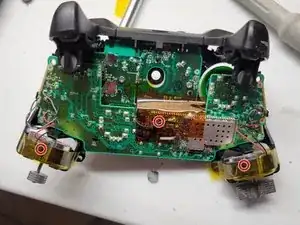
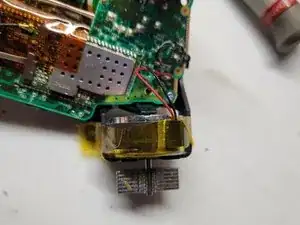
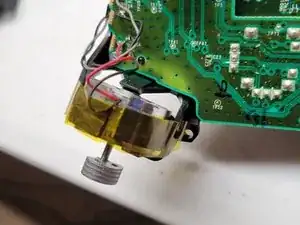
    • Pega con cinta los motores Rumbler/shock en su lugar.

    • Esto evitará que los motores se caigan.

  5. iqgdKTgD5ghZ2AiA
    iqgdKTgD5ghZ2AiA
    k5hd4bkef3GQZcnV
    • Orienta el controlador de modo que la placa frontal quede hacia arriba.

    • Levanta la cubierta frontal del controlador.

  6. jALZRgrIkQxcoU2w
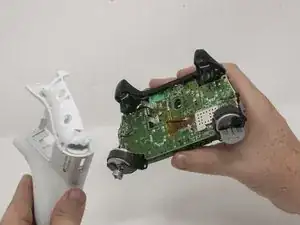
    • Voltea el controlador boca abajo y levanta suavemente la placa trasera.

    Reassembly: When placing the back cover on: notice that the battery terminals need to slide inside the cover first. Then compress the triggers slightly, Then the cover will be aligned correctly. Then add the front cover and add screws so it doesn’t come undone.

    hunteil -

  7. SBpFEREdAboEdgLe
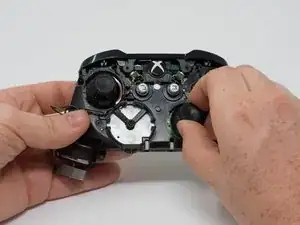
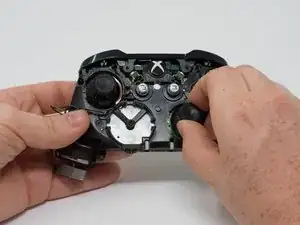
    • Retira los joysticks del controlador.

    Are the joystick potentiometers soldered to the mother board or just push fit, this guide doesn’t mention soldering so I’m assuming the latter?

    Can you get genuine replacement joystick potentiometers as I’ve only seen cheap eBay type ones?

    Alan -

    The actual joysticks themselves are soldered into the bottom motherboard.

    Bryan Remely -

Conclusión

Para volver a armar tu dispositivo, sigue estas instrucciones en orden inverso.

Dylan Gross

Miembro Desde 25/09/17

4590 Reputación

6 comentarios

How about the square thing with the stick and hinges that the joystick is attached to? I think it’s called the Module. I have a joystick drift / drifting problem and that may help me out. Thanks.

Cory C -

Agreed. That’s actually the part I need to replace too. The module.

Thomas Tomchak -

followed this guide to take the controller apart because I had a joystick that was sticking, my solution was to put some 3in1 oil on the module that was sticking and it seems to be working a lot better now.

John Jaggi -

@corytc and @tomchak I did replace the module, in general, you buy (Amazon or eBay) you will receive a module of 6 modules you need a multimeter and test each module interface, measure both resistances and subtract them, the one nearest zero is the module you will use since is the one with least drift from the factory.

Just disassemble it, turn upside down uses a solder remover and unsolder the old one, place the new one solder back, boom you are done.

Like you will need an iron solder with medium and thin tips, I used lead-free solder, so is a patience test, be careful with the wires from the rumbles, try not to unsolder them since is a thin wire and is difficult, like I have big hands so took me a while to solder back.

Luis Vitorio Cargnini -

Just want to say the hardest part is carefully prying off the plastic covers on the handles. It’s also not necessary to remove the back cover for simply replacing the joysticks. Other than that, it’s very easy. I would guess this is rated at moderate difficulty simply due to the plastic covers.

Will -

Where can one get the replacement joysticks ?

Keven Dubois -