Introducción
Actualiza los módulos de RAM para un aumento instantáneo de la velocidad.
Herramientas


Partes
-
-
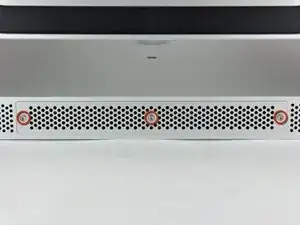
Afloja los tres tornillos Phillips que sujetan la tapa de acceso al extremo inferior de tu iMac.
-
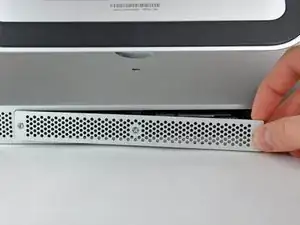
Quita la tapa de acceso de tu iMac.
-
-
-
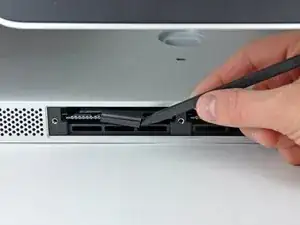
Usa tus dedos o la punta de un spudger para deslizar la lengüeta de plástico de la bandeja de RAM de la ranura RAM.
-
-
-
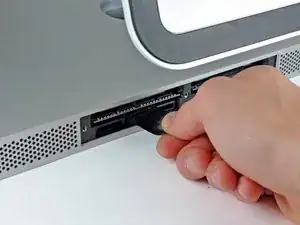
Tira de la pestaña de plástico negro del iMac para expulsar el chip de RAM de su ranura.
-
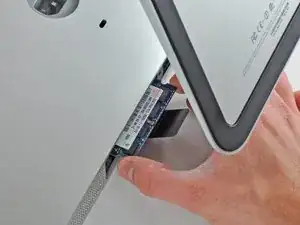
Usa tus dedos para deslizar el chip RAM fuera de su ranura.
-
Para volver a ensamblar tu dispositivo, sigue estas instrucciones en orden inverso.

8 comentarios
Interestingly, the mid 2011 iMac 27 inch also goes to 12GB!
I originally thought I'd be upgrading to 8GB today but found 4 slots instead of 2 :-)
As long as the two front (close to the screen) slots are paired with the exact same RAM config.
For example:
Two front slots Apple 2GB chips = 4GB.
Two rear slots, Crucial Lexar 4GB chips = 8GB
Total 12GB
Hoorah no waste and more RAM, come on Lion... I'm Ready!
Need a#0 screwdriver, not #1
Be sure to really push the RAM all the way into the socket. I had a "no RAM" error beep when I first booted up my iMac after doing this. Just an extra two millimetres was all it needed to be properly installed. It can be quite tough to get in.
I am going to put a very important comment here. Before you start this process listen to the fans on your iMac do any of them sound obviously loud (think about how quiet your iMac used to sound as a reference) If you notice one or more of them sounding substantially loud compared to the others consider locating a replacement fan prior starting this process. After all if you are already “in the neighborhood” it is a shame to do all this work only to have to disassemble your imac a couple weeks later because you realize the fan is failing. I speak from my own personal learning experience of having to disassembly my iMac 3 weeks later because the HDD was failing and apparently the moving the fan around was just enough to push it to start really under performing.
Wizbang FL -
I’m not sure why it is necessary to remove the RAM. As far as I can tell, it can remain in place during this procedure.
gordonhamachi -